


You’ve spent weeks polishing a course, recording lessons, designing worksheets, and preparing a sales page. Then launch day arrives, and the response is quiet. The topic sounded useful, but you never confirmed how your audience described the problem, what they’d already tried, or where they expected to get stuck.
That’s where the techniques of market research earn their place. Strong research combines what learners say with what they do. A survey can show which topics attract interest, while interviews explain the frustration behind that interest. Analytics can reveal where students stop watching, and exit interviews can show why they decided not to continue.
The practical framework below connects 10 research techniques to the full creator lifecycle. Each method includes when it works best, a short workflow, a realistic course or membership scenario, its limitations, and a useful metric or template. LearnStream readers can apply the findings to course topics, membership offers, onboarding, and retention decisions without turning every business choice into a large research project.
1. Surveys and Questionnaires
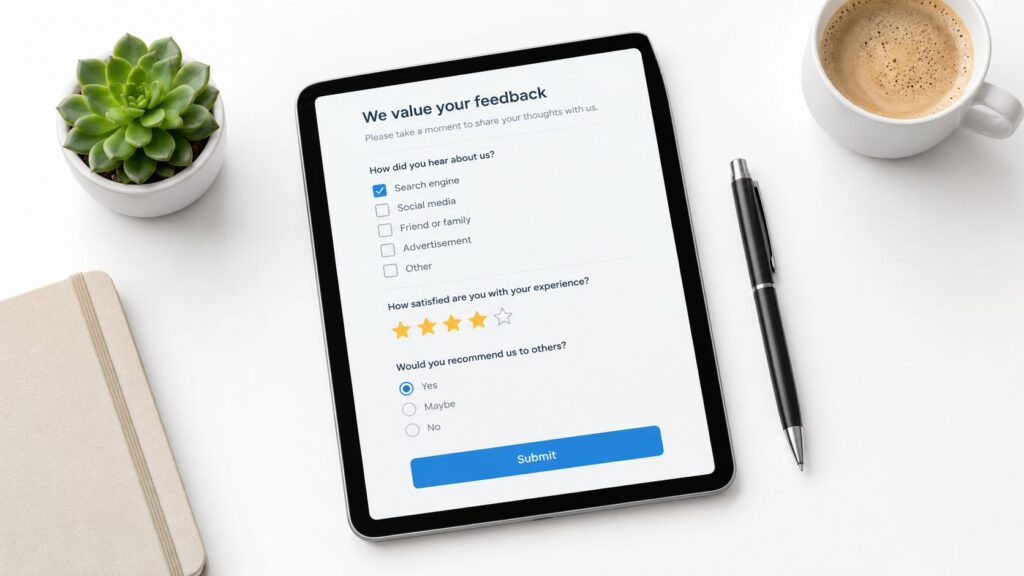
Surveys give you a direct way to ask an audience what they wants to learn, buy, or improve. They’re useful before a launch, after a cohort finishes, or when a membership owner is deciding which benefit to add next.
A course creator might ask past students to rank possible new topics, describe their biggest obstacle, and choose between different pricing structures. A membership site owner could test whether people prefer a lower-cost library plan, a community-focused tier, or access to live sessions. Learning platform providers can use the same approach to ask potential customers which features matter most.
Online surveys remain widely used. One industry report found that 62% of businesses used at least one online survey tool in 2023, while the average response rate was 12.3%, down from 18.7% in 2018. The report also found that 52% of completions came from mobile surveys in 2023, and 78% of marketing teams used online surveys to measure customer satisfaction. The online survey benchmarks make the practical implication clear, mobile design and response quality deserve as much attention as the questionnaire itself.
A simple survey workflow
Keep the questionnaire focused. Ask one thing at a time, avoid leading language, and test it with a small group before sending it widely.
- Limit the scope: Keep the survey under 10 questions when possible.
- Mix question types: Use multiple choice for comparison and open text for learner language.
- Make completion easy: Use a tool such as Typeform or SurveyMonkey and check the mobile layout.
- Offer a relevant incentive: Exclusive content or a course discount can encourage participation.
- Use the findings: Turn repeated answers into course topics, landing-page wording, or onboarding changes.
A survey can tell you that learners want a course on email marketing. It usually won’t explain which failed attempt made the problem urgent. For that, pair the results with interviews or community monitoring. Learn more about turning responses into action in this guide to managing course feedback surveys.
2. One-on-One Interviews
A private conversation reveals details people often skip in a form. Interviews are especially useful when you’re trying to understand motivations, obstacles, and the words potential learners use to describe their situation.
Suppose you’re building a course for instructors launching their first online program. A survey might show broad interest in course creation. Individual interviews can uncover the harder issues, such as uncertainty about lesson structure, fear of choosing the wrong platform, or confusion around selling before the content is complete.
The same technique works after enrollment. Speak with failed course starters and ask them to describe what happened before they stopped. Talk with corporate training managers about their learning management system requirements. Ask instructors what made their first launch difficult. The conversation should feel like research, not a disguised sales call.
Let the participant do most of the talking
Start with prompts such as, “Tell me about your experience with online learning.” Follow interesting answers with questions about what happened next, what they tried, and what made the situation difficult.
Recruit through your existing customer network, professional groups, or communities where your audience already spends time. Tools such as Otter.ai can transcribe sessions, but automated transcripts still need review. A transcript captures words, not always hesitation, uncertainty, or the context behind an answer.
Practical rule: If a participant gives you a feature request, ask what problem that feature would solve before adding it to your roadmap.
Interviews have a clear trade-off. They provide depth, but they’re slower to arrange and harder to summarize consistently than surveys. Look for patterns across conversations rather than treating one enthusiastic suggestion as proof of demand. Record the exact phrases that describe pain, desired outcomes, and buying hesitation. Those phrases can later shape your course title, sales page, lesson examples, and email sequence.
3. Focus Groups
Focus groups bring several people from your target audience into one conversation. Their interaction can reveal agreement, disagreement, and assumptions about a course or membership offer.
An owner of a membership community might invite inactive members to explain why they stopped renewing. A course creator could compare two landing-page versions and ask prospective students what each promise suggests. A corporate learning manager might discuss whether employees prefer short lessons, guided practice, or a larger self-paced program.
The shared setting creates useful energy, but it can distort responses. One confident participant may dominate, while others agree publicly despite private doubts. Invite quieter members to speak, and ask participants to form an initial view independently before anyone anchors the group.
Design the conversation around decisions
Recruit people who resemble the audience you serve, but include relevant differences, such as active and inactive members. Ask about the problem they face, the alternatives they use, the learning experience they want, and what makes them enroll, continue, or leave. Keep the guide flexible enough to follow an unexpected thread.
- Start with the problem: Ask how participants handle it today.
- Test the message: Show course titles, promises, or formats without defending them.
- Avoid leading questions: Ask what they expect from a shorter course instead of suggesting it is easier.
- Capture context: Record with permission, then review tone, hesitation, and disagreement rather than relying only on notes.
- Use virtual sessions: Zoom can reduce scheduling and logistical work.
Capture the phrases participants use for confusion, desired outcomes, and objections. Those words can shape course positioning, lesson examples, onboarding messages, and retention offers.
A focus group helps you examine language, reactions, and group perceptions. It does not measure demand across a broad audience. If participants favor a new community feature, survey a larger audience before building it. If they criticize a sales page, test a revision with real visitors and observe enrollment behavior.
4. Social Listening and Community Monitoring
Learners often explain their obstacles publicly before they ever join a course or membership. Social listening reviews conversations across social networks, forums, discussion boards, podcasts, and private communities you are permitted to observe.
A programming educator could monitor Reddit communities such as r/learnprogramming to see where beginners stall. A corporate learning consultant might follow LinkedIn discussions about reporting, adoption, and learner engagement. Facebook groups, podcast discussions, and membership-site posts can reveal the words people use when they describe confusion, desired outcomes, or reasons for leaving.
Start with repeated patterns, not one vivid complaint. Save the question, its context, and the speaker’s wording. Those records can guide a course title, module names, lesson outcomes, enrollment copy, onboarding messages, and retention offers.
Tools should match the job. Google Alerts can track topic terms. Hootsuite and Brand24 can monitor several platforms, while hashtags related to online learning, course creation, and membership communities can surface active discussions. A simple evidence file may be enough for a small creator.
Record each observation with its date, channel, context, and exact wording. Compare channels because LinkedIn language may differ from Reddit language. Separate complaints from demand, since a highly visible problem may not reflect the wider market. Participate responsibly by answering useful questions rather than collecting comments without contributing.
Online communities are selective, and frustrated people may post more often. Treat monitoring as hypothesis-building, then test those hypotheses with interviews or surveys before changing the curriculum or investing in a feature. Guidance on respectful participation appears in LearnStream’s community engagement best practices. For tool selection, consult Bazzly’s social listening software guide.
5. Competitor Analysis
Competitor analysis gives you context for decisions about positioning, pricing, curriculum, community, and onboarding. You’re studying what comparable providers offer, how they explain it, and where their customers still experience friction.
Start with a stable peer group. Benchmarking guidance recommends selecting 3 to 5 direct competitors, applying the same metric definitions and time periods, and refreshing the comparison quarterly or semi-annually. This benchmarking guidance also recommends combining quantitative indicators such as pricing, conversion, retention, and engagement with qualitative signals such as sentiment, feature gaps, and complaints.
A creator comparing membership platforms might examine how Circle.so and Mighty Networks present community features. Someone researching course marketplaces could review structure and pricing on Udemy or Teachable. Learning platform buyers can read G2 and Capterra reviews to identify recurring complaints about setup, reporting, or support.
Build a comparison you can maintain
Create a spreadsheet with columns for offer type, audience, course structure, pricing presentation, onboarding, community features, email messaging, and recurring review themes. Sign up for competitor email lists, follow their launches, and experience their onboarding where access is appropriate.
A competitor’s feature list shows what they built. Customer complaints show where the opportunity may be.
Competitor research has limits. Public pricing may not reveal discounts or custom plans. Reviews can overrepresent unusually happy or unhappy customers. A competitor’s high-visibility launch may also tell you little about its long-term retention.
Use the research to identify gaps and standards, not to copy a brand. Your advantage may come from clearer guidance, stronger practice activities, a better onboarding path, or a more focused audience. Revisit your comparison on a consistent cadence so changing feature sets and messaging remain comparable.

6. Analytics and Behavioral Data Analysis
A course landing page may attract strong traffic, yet enrollment stalls. After students join, the welcome lesson may receive many opens while the next module loses them. Analytics helps locate these breaks across the creator lifecycle, from validating a course idea to improving completion and membership retention.
Review website visits, enrollment paths, lesson activity, time spent in modules, assessment attempts, and points where learners stop. A membership owner might see new users reach the welcome page without taking the next action. A pricing page can attract visitors but produce few trials or paid plans.
The numbers identify friction’s location, not its cause. A difficult lesson may be too advanced, poorly titled, awkward on mobile, or placed before learners have the required foundation. Treat each pattern as a question for interviews, usability sessions, or surveys.
Turn behavior into decisions
Set clear goals and events in Google Analytics or your learning platform’s native reporting. Track actions tied to business and learner outcomes, such as starting checkout, completing onboarding, opening a lesson, posting in the community, or returning after an absence.
Compare learners who joined through different campaigns or reached different stages. Heat-mapping tools such as Hotjar can show where users click, scroll, or hesitate on a sales page. Keep an investigation note for each important pattern:
- Observed behavior: Where do users stop or hesitate?
- Possible explanations: What could produce that behavior?
- Research follow-up: Which interview, usability session, or survey question can test it?
- Decision: What will you change, and what will you monitor afterward?
Choose metrics that connect to a decision. A lesson with many views may still produce weak understanding, while a quieter discussion may support retention. Pair behavioral data with qualitative research to identify both the problem’s location and its cause.
7. Cohort Analysis and Segmentation Research
A course can attract many learners while serving different needs. Cohort analysis groups learners by a shared characteristic, behavior, or acquisition period, then compares how each group moves through the learning experience.
Start with a practical question: do YouTube learners progress differently from email subscribers? Other useful comparisons include free-trial members and low-cost offer buyers, onboarding completers and non-completers, or bundle buyers and single-course customers. These groups may enroll for different reasons, reach different lessons, and renew at different rates.
Keep the first analysis focused. Too many categories make results difficult to interpret, while small groups provide weak guidance. Check group size alongside engagement. A highly active cohort may suggest a strong offer, but it needs enough members to justify changing onboarding, messaging, or product design.
From segments to lifecycle decisions
Use a pivot table or dashboard to compare enrollment, lesson progression, community participation, support requests, and renewal behavior. Add lifecycle stage to acquisition source. A new member and a long-term member may come from the same channel but require different prompts, examples, and success milestones.
A useful workflow looks like this:
- Choose a meaningful distinction: Start with acquisition source, offer type, onboarding behavior, or lifecycle stage.
- Locate the behavioral difference: Compare activation, progress, engagement, and retention.
- Investigate the cause: Interview learners from contrasting cohorts to learn what shaped their experience.
- Test a targeted response: Adjust one onboarding message, lesson path, or offer for a promising segment.
- Scale carefully: Extend the change only after it performs for the intended group.
Segmentation should change a decision, not merely decorate a dashboard. The This audience segmentation guide offers further context, while your learner behavior determines which groups deserve attention. Used across the creator lifecycle, cohort analysis can refine a course idea, improve enrollment messaging, support completion, and guide retention work.
8. User Testing and Usability Research
User testing exposes confusion that surveys rarely capture. Give real people a task, watch how they attempt it, and note where the interface or instructions fail to make the next step obvious.
For an online course, ask a new student to find the first lesson, locate an assignment, submit work, and return to the course dashboard. For a membership site, ask a new user to complete signup, find the community, and identify what to do during the first session. For a learning management system, ask an instructor to create a course or locate a reporting feature.
The task needs to sound realistic. “Explore the platform” produces vague observations. “Find and enroll in the advanced Python course” gives you a clear action path and makes hesitation easier to identify.
Watch behavior before explaining anything
Unmoderated tools such as UserTesting or Maze can help you gather sessions quickly. Moderated sessions let you ask follow-up questions such as, “What are you looking for now?” without correcting the participant or giving away the answer.
Test early, including low-fidelity prototypes. It’s cheaper to discover that a course structure is confusing before recording every lesson. Record sessions with permission and review them efficiently, including at faster playback when appropriate. Look for repeated problems with navigation labels, pricing explanations, lesson order, mobile layouts, and calls to action.
User testing tells you whether people can complete a task. It doesn’t prove that they value the course enough to buy or continue. Combine usability findings with interviews, analytics, and enrollment data.
A practical demonstration can make this method easier to understand:
9. A/B Testing and Experimentation
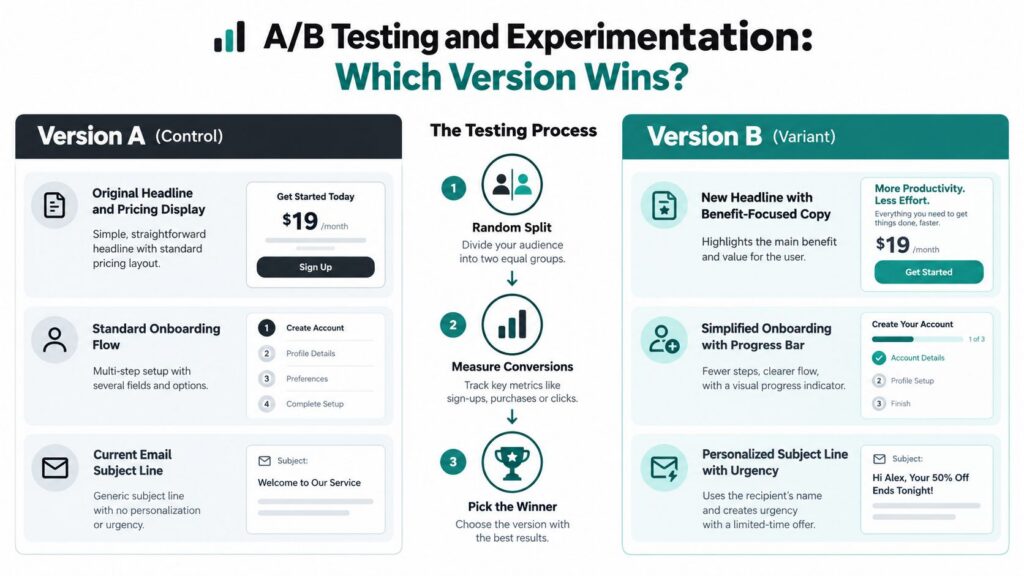
A/B testing gives course and membership creators a controlled way to choose between two versions of an experience. The useful question is not which version wins, but which change improves a defined stage of the learner journey.
Start with a decision. For a new course, test two sales-page headlines and measure completed checkout. For an established membership, compare welcome sequences and track first-week activation or lesson progression. Other candidates include calls to action, pricing displays, email subject lines, onboarding steps, and module order.
A single test should answer one meaningful question. Changing the headline, layout, price display, and testimonials together may produce a lift, but it hides the reason for that result.
Set the test around a decision
Choose the primary metric before launch. Trial starts, completed checkout, activated members, and lesson progression each represent a different business objective. Optimizely and built-in platform features can support the setup, while a calculator can help assess whether a result is statistically meaningful.
Run the test for enough time to include normal traffic patterns. The plan recommends at least one week or 100 or more conversions per variation. Treat that benchmark as a practical threshold, not proof that the conclusion is reliable. Audience quality, traffic consistency, seasonality, and the size of the difference still affect interpretation.
Use a short test record:
- Write a hypothesis: Name the change, expected outcome, and reason.
- Protect the variable: Keep other meaningful elements consistent.
- Record the result: Log the audience, dates, metric, and decision.
- Apply learning carefully: A sales-page result may not transfer to onboarding or retention.
- Build a research log: Store findings so later experiments build on evidence rather than repeat old mistakes.
For a focused sales-page process, follow this guide to split testing a course sales page. If paid acquisition is part of the experiment, review guidance on optimizing ad performance with tests. A higher enrollment rate is useful only if the resulting learners also start, complete, and continue.
10. Customer Interviews and Exit Interviews
A learner finishes your course but stops using the membership two weeks later. Another cancels after struggling to find the right lesson. Interviews at these moments connect research to the later stages of the creator lifecycle, from improving completion to retaining members.
Speak with graduates about the activities that helped them make progress, then ask what they did with that learning. Loyal members can explain which features earn repeat use. Cancelled subscribers can describe what happened before they left, what disappointed them, and what would have justified staying. For members who stopped engaging without cancelling, ask what they expected to find and what disrupted their routine.
Schedule exit interviews soon after cancellation or disengagement. Memories lose detail, and the participant may already have chosen another course or community.
Start with a specific moment
Ask for an event before asking for an opinion. Questions such as “what happened?” and “how did you decide?” usually produce clearer detail than a request to defend the decision.
- Examine a lesson: Which lesson helped most, and what did the learner do afterward?
- Locate friction: What made returning or continuing difficult?
- Trace the decision: How did the person decide to cancel or stop?
- Identify alternatives: What did they use instead, if anything?
- Test an improvement: What would have made the offer more useful then?
Offer a fair incentive, such as extended access or a course discount, without suggesting the answer you want. Keep attention on the participant rather than on note-taking. After several conversations, group similar causes and separate isolated complaints from recurring patterns. A cluster of learners reporting confusing onboarding may justify a clearer path to the first lesson. Repeated comments about missing practice or support may point to completion and retention problems, while pricing feedback can inform the next offer review.
Top 10 Market Research Techniques Comparison
| Method | Ideal use cases | Key advantages |
|---|---|---|
| Surveys and Questionnaires | Testing topics, pricing, feature priorities at scale | Scalable, cost‑effective, easy to analyze |
| One-on-One Interviews | Validating ideas, exploring user “why”, early discovery | Nuanced understanding, follow-up probing, rapport |
| Focus Groups | Messaging testing, exploring attitudes, concept validation | Idea generation, observe interactions, faster multi‑person feedback |
| Social Listening & Community Monitoring | Identifying trending topics, content ideas, VOC research | Authentic, continuous, low ongoing cost |
| Competitor Analysis | Positioning, feature benchmarking, pricing strategy | Identifies opportunities and differentiation points |
| Analytics & Behavioral Data Analysis | Optimizing completion, retention, conversion funnels | Unbiased behavioral data, continuous measurement |
| Cohort Analysis & Segmentation Research | Personalization, channel performance, retention strategies | Reveals high-value segments and targeted actions |
| User Testing & Usability Research | Testing navigation, onboarding, signup and flows | Reveals real user behavior and quick actionable fixes |
| A/B Testing & Experimentation | Landing pages, pricing, emails, onboarding optimizations | Definitive performance data; reduces guesswork |
| Customer & Exit Interviews | Reducing churn, prioritizing product improvements, loyalty | Feedback from paying users; actionable retention signals |
Turn Research Into Your Next Smart Move
Research becomes useful when each method answers a specific decision. A social listening scan can reveal that learners repeatedly struggle with a problem. Competitor analysis can show how other providers position their solutions. Neither result, on its own, proves that your audience will buy a new course.
Use the methods in sequence, then return to them as the offer develops. Start with social listening or competitor analysis to frame the opportunity. Move to interviews or focus groups to understand the problem, the existing alternatives, and the language people use. Use a survey to measure how broadly those themes appear across your audience.
Once you have an offer, user testing can expose friction in the sales page, signup flow, course navigation, or onboarding experience. After launch, analytics can show where learners stop, cohorts can reveal which groups behave differently, and exit interviews can explain why members leave. A/B tests then let you evaluate a focused change instead of relying on preference or instinct.
A practical research worksheet
Keep one working document with six fields:
- Question: What decision are you trying to make?
- Method: Which technique can answer that question directly?
- Audience: Who needs to participate or whose behavior will you study?
- Evidence: What did people say, do, or choose?
- Decision: What will you change, keep, test, or postpone?
- Success metric: What observable result will tell you whether the decision helped?
This structure prevents research from becoming a collection of interesting comments. It also makes limitations easier to spot. A small interview set can generate useful hypotheses, but a survey may be needed before you commit to a major course topic. Analytics can identify a drop-off point, but interviews or usability testing may be needed to explain it.
Market research has also evolved over time. A historical review describes early developments in the 1840s, while modern statistical rigor crystallized during the 1940s and 1950s through probability sampling, focus groups, and experimental design. Later milestones in the 1970s and 1980s helped establish interpretative and qualitative research, which explains why today’s strongest programs combine quantitative and qualitative methods. The historical review of market research offers useful background for understanding that progression.
Conjoint analysis, developed by marketing professor Paul Green and influential from the 1960s, remains useful for estimating how people trade off features, benefits, and price. Surveys also became more formal during the 1925 to 1960 period as researchers improved poll methodology and used responses to describe populations rather than isolated anecdotes. This history of market research explains why these techniques still support decisions about forecasting, segmentation, product design, and pricing.
AI can speed up analysis, especially when you have many open-ended responses. Industry reporting found that 64.1% of researchers increased their use of AI tools in 2025, while 42.75% said they weren’t excited about using synthetic respondents. The reporting on AI, synthetic respondents, and qualitative research supports a cautious approach. Use synthetic respondents for early exploration, hypothesis generation, or pretesting, then validate important decisions with real learners. Check the source data, keep the process transparent, and don’t allow generated feedback to replace the people your course or membership is meant to serve.
Choose one live decision today, complete the worksheet, and run the smallest credible research activity that can inform it. Start with learner language, connect it to behavior, and use the result to improve your topic, offer, onboarding, completion experience, or retention plan.


